Company: Arctic-Cooling
Product: 64 Freezer Pro
MSRP: $29.99 @ Newegg.com
Reviewed By: Igor P. (X-Vert)
Supplier: Arctic-Cooling
Introduction:
"ARCTIC COOLING is a leader in creating thermal cooling solution for personal computer systems that enable CPU (Central Processing Unit), GPU (Graphic Processing Unit) and PC-case cooling while reducing the noise level. Increased heat generated by modern computer systems has overwhelmed most existing CPU cooler manufacturers in their efforts to keep pace with the demands in terms of cooling. At the same time noise pollution caused by today's IT-systems has increased, severely affecting productivity in open office environments."
More info on Arctic-Cooling can be found here.
Product:
Today I will be reviewing the Arctic-Cooling 64 Freezer Pro Heatsink which AC has supplied us with. It's basically an improved version of the 64 Freezer heatsink, there are now 6 heat pipes instead of 4, the fan mounting is improved which features the Patented Vibration Absorption, and there are 42 aluminum fins instead of 40 that the 64 Freezer had. In this review, we will get into the depth of the product, it's performance, the con's and the pro's, so grab a bottle of Bawls and enjoy.
Before we continue, here are the specifications, and compatibility provided by Arctic Cooling
Compatibility:
Packaging and Accessories
The AC 64 Freezer Pro box is nice and to the point. It's a small black square box with the AC logos on all of the sides. Also includes some very nice graphics of the cooler itself.

Inside, the heatsink is surrounded by molded plastic to fit the cooler so its not thrown around in the box. On top of the packaging is a manual and a AC case badge.


The Heatsink
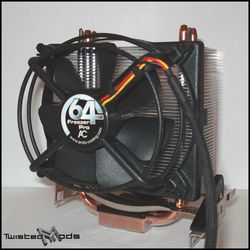
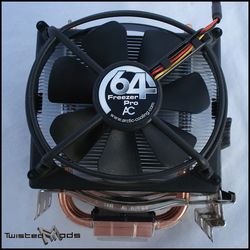
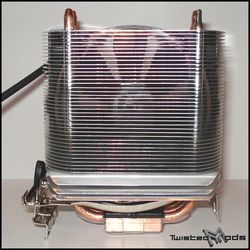
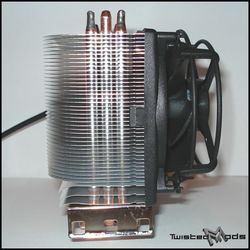
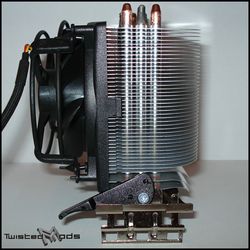
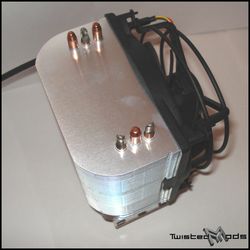
Once the cooler is out of its packaging, we can closely look at its features that make this heatsink so special. As you can see this thing is massive, it's larger than your average heatsink, but very light compared to most of the heatsinks out there. First thing I noticed after removing the heatsink from its box is the copper base which allows for faster heat transfer. Then you notice the 6 heat pipes coming out of the base, 3 on each side, they run vertically through the fins and stick out on top of the heatsink. The heat pipes are there to carry the heat away from the CPU and into the fins. Although there's a flaw that Arctic Cooling might have overlooked, in order for the heatpipes to work effectively, they must be parallel to the ground to work best, so in some cases the cooler will not perform like it should. Check out the pictures below for the general overview of the heatsink.
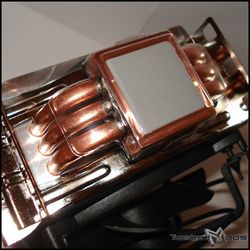
Moving on to the copper base, it's easily noticeable that AC has already applied some of their thermal paste, so you wouldn't have to bother getting any yourself, al thought that's not mentioned anywhere on the box, or most online retails that sell the heatsink (including NewEgg.com). The thermal paste that's applied is Arctic-Cooling's own paste called MX-1, out of the box its protected by a clear plastic cover so the paste doesn't smudged. Before removing the paste I thought I would give it a try and see how it performs compared to other thermal pastes. One thing I'd like to mention before I reveal the results is that AC was definitely not cheap on their paste. It was applied way too thickly, a lot of excess squirted out the sides when the HS was applied for the first time.
Plastic Cover On |
Plastic Cover Off |

Tested in Celsius |

Those are the results from different thermal pastes I've used on the AC 64 Freezer Pro Heatsink. I gave each paste 3 days (total of 72hours) to settle and checked the CPU temperature every morning. Every morning I woke up, the temperature was slightly lower, I made sure the room temperature is also the same by having the AC set to 75°F. The MX-1 isn't much different from the Arctic Silver 5, both give the same results. For the rest of the review, I decided to stick with the MX-1 because it is part of the review.
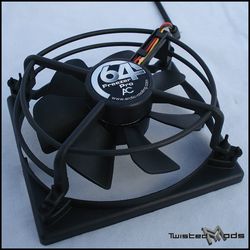
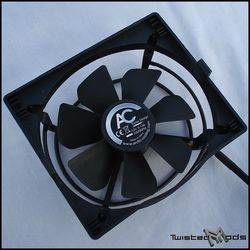
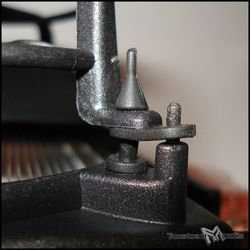
Now we move on to the fan, my favorite features, and the most important aspect of the heatsink. A 92mm fan, consisting of 7 blades, and guarded well to keep the users out of harms reach. It's supported by the Patented Vibration Absorption rubber posts which also dampen the sound, and reduce vibration. At full speed this thing is as quiet as a dead bug. The fan runs on 12V, drawing 0.13A and has a maximum power draw of 1.56W. It is also rated for 2200RPM, and has an air flow of 40CFM at max speed. Making this fan complete is the high quality braided cable w/ a black 3 pin jack, very stylish if you're cable clean freak like myself.

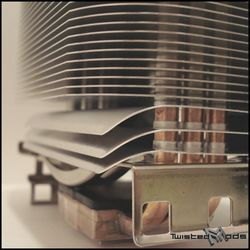
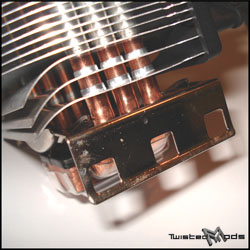
Out of the 42 fins, the bottom 3 fins are curved downwards to allow the airflow on to the motherboards components, such as voltage converters or even the Memory (RAM), it all depends which way the heatsink is facing... BUT, being that the fan support is blocking those 3 fins, they are is going to be fairly convenient at best.
According to Arctic-Cooling:
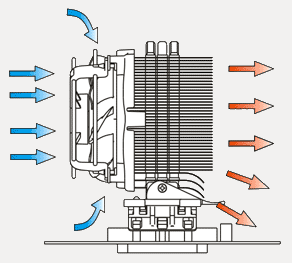
"Integrated Cooling of Voltage Converters Air is drawn in from the side of the fan to cool the components around the CPU. Some air is blown out towards the voltage converters on the mainboard with the bent fins at the bottom."
Installation
Installing the heatsink couldn't be any easier, it takes seconds to do it. Due to it's light weight, it uses a standard K8
Retention Module
unlike most of the aftermarket heatsinks which
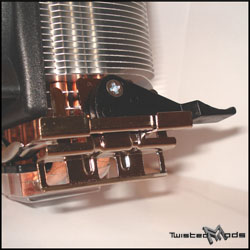
need to be screwed into the motherboards' back plate. Another nifty feature on this heatsink is the rotational position. The clamps can be disassembled and rotated anyway position desired. Al thought you have that option, it's best to have the fan facing the front of the case, for more effective cooling as it sucks the air from the intake fan and out into the exhaust fan. To disassemble the clamps you simply unscrew the one bolt that's on the black latch, remove the latch and the clamps just come apart.
Testing
I tested this heatsink in my everyday computer, here are the specs:
I tested this heatsink with MX-1 thermal paste by recording the temperatures of my CPU under Idle and Load. I'll also be comparing it with the stock AMD 3800+ Heatsink box, with Arctic Silver 5 thermal paste.
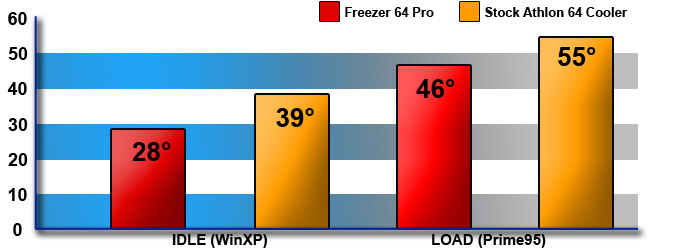
Idle - After installing the heatsink using the MX-1 thermal paste, I let the system run for 3 straight days, like I mentioned before, the paste has to settle. On day 3 is when I started the testing, first I let the system run Idle for about 5 hours with the fan at max RPM. The results are far better than what I expected. It's lowest temperature was 28°F in a 75°F environment. It out performed the AMD heatsink by 11°C which is a lot, considering this is Celsius we're talking about.
Load - After finally testing the system in Idle, I decided to test the beast and see what it was capable of, and yet again it has exceeded my expectation. I ran Prime95 for 5 hour, the results were astonishing. The temperature maxed out at 46°C, and went nowhere above that, while the stock AMD heatsink hit 55°C. Yet again it out performed the AMD heatsink, but this time by only 9°C.
Result: After putting the AC Freezer 64 Pro through such stressful conditions, it is obvious that it just won't give in. Even having it under full load, its still one of the quietest heatsinks on the market.
Results In a Graph Format:
Conclusion
In general, the AC Freezer 64 Pro is extremely quiet and effective, just what you are looking for in a non-stock cooler. Price is fairly low, and performs tremendously compared to other aftermarket coolers. You also have to consider how quiet it is, even under stressful condition. The easy installation, it's in fact easier to install than the stock AMD cooler, and any not so experienced person can install it within a matter of seconds. It's VERY practical. Al thought of course you cant expect it to set new cooling records, but in my book, its one of the most respectable coolers I've ever put my eyes on. Although there are some flaws with the cooler, for instance, in some cases the heatpipes might not be faced parallel to the ground, but either way... it's pro's out weigh the con's.
Overall, I'm quite happy with this heatsink, and I love how it performs, especially for it's price. I highly recommend it to anyone who's in a market for a cheap, easy to install, yet very effective heatsink.
Pros:
Cons:
Thanks to Arctic-Cooling for supplying us with this great sample !
Score